Looppanel helps researchers analyse interviews — faster.
Looppanel is a qualitative research tool: researchers upload interview recordings, the product transcribes them, and AI helps with note-taking, tagging, and insight generation. The premise is that the most painful part of UX research isn't the interviews — it's the analysis that comes after.
I joined as the product designer in mid-2022. Over the next two years I worked across the full product — onboarding, analysis flows, website, AI features — but the work I'm most proud of is the AI Insight Wizard, which launched in March 2025 after roughly 14 months of research, experimentation, and iteration.
This is the story of how it came to be.
We were losing deals because of AI perception — not AI capability.
In early 2024, a pattern kept appearing in our sales recordings and feedback calls. Prospects who had trialled the product would say some version of the same thing:
What made this frustrating was that on paper, we had comparable AI features — sometimes more. We had auto-tagging, AI notes, and insight generation. But users didn't feel it.
To understand this properly, I did a structured win/loss analysis in January 2025 — pulling data from lost-deal calls, in-pipeline email threads, and trial feedback sessions across six companies. I also did a direct feature comparison against the competitor most often cited.
The pattern that emerged was clear: the gap wasn't in features — it was in the mental model. Our AI was built around the existing research workflow: upload → tag → generate insights → write report. Step by step. Competitors were collapsing that into one: describe what you care about, get your answer.
AI assists each step of the existing workflow — tagging, summarising, generating insights one at a time.
Skip the steps. Tell the AI what you care about. Get a cited, structured answer directly from the transcripts.
We were busy perfecting the steps. They were perfecting the outcome.
I ran the analysis myself to feel the friction firsthand.
A "10x analysis" brainstorm in January 2024 was the starting point. But I didn't want to design a solution based on a whiteboard session. I needed to understand what analysis actually felt like at every step.
So I ran manual analyses on three live customer research studies, spending hours doing what our users did: reviewing transcripts, clustering themes, writing summaries, creating insight documents. I also spent weeks watching session recordings of users working through the product.
What I noticed:
- Researchers wanted to feed the AI context — "here's what this study is about, here's what I care about most" — but there was nowhere to do that.
- The hardest part wasn't generating insights. It was having confidence in them. Every AI output needed to be traceable back to something a real participant said.
- Users weren't stuck on note-taking or tagging. They were stuck on the analysis-to-communication gap: getting from raw data to something they could share with their team.
- The best sessions were when the researcher had a clear question. The worst were when they didn't, and the AI gave back generic themes.
This became the brief: build something where researchers can describe their study context and what they care about most, and get back a grounded, cited, shareable output.
I tested every competitor's AI — hands-on, project-by-project.
In March 2024, I spent time testing notably, qoqo, and Dovetail's analysis features with real research data. I wasn't just looking at screenshots — I was running actual projects through each tool to understand what the model could do, how the UX shaped the output, and where each fell short.
The key insight from this exercise: none of them solved the context problem well. You couldn't tell the AI "this was a retention study, I care most about drop-off reasons in week two." The models were flying as blind as ours.
That gap — context-aware, cited, conversational analysis — became our opportunity. If we built something that let researchers set their context and ask follow-up questions, with every output backed by actual transcript quotes, we'd have something genuinely differentiated.
I wrote the prompts before I opened Figma.
Designing an AI feature requires understanding what the model can actually do. In February 2025, before working on visual designs, I spent a week experimenting with prompts directly in OpenAI Playground — testing them against real research data from our internal projects.
I was testing for several things: how much context the model needed to produce good output, what phrasing prevented over-generalisation, how to make the model respect frequency of evidence (not just presence), and how to keep outputs concise without losing nuance.
After multiple iterations, the core summary prompt looked like this:
The frequency rule was the most important detail. Without it, the model would surface a compelling quote mentioned once and treat it with the same weight as a pattern across ten interviews. Researchers hold themselves to evidentiary standards — the model had to too.
For follow-up questions, I also wrote a guardrail prompt to prevent the model from inventing answers when a question fell outside the transcript data:
Treating prompts as design artefacts — iterating on them like prototypes, observing outputs like user tests — changed how I think about AI product design. The words you give the model shape the experience as much as the interface does.
Two versions. One team conversation. One direction.
On February 17, 2025, I shared two design directions with the team.
AI Summary with limited iteration
A lightweight chat experience: input what you care about, get a summary, regenerate with more context. No templates, no follow-ups. Fast to build, lower risk.
The bet: researchers just want the summary. Everything else is distraction.
AI templates with follow-up questions
A richer experience: choose a template (Summary, Pain Points, Recommendations), input study context, get output, then ask up to five follow-up questions. The AI remembers the conversation.
The bet: the value isn't the first output — it's the ability to drill down. A summary is a starting point, not an ending point.
The team discussion that followed sharpened the direction. One teammate's reaction: "ability to iterate in certain ways is more valuable than multiple templates." Another pointed out that citations — every output backed by a clip from the recording — were the trust layer that would make the difference.
We aligned on V2 as the direction, but scoped the first release carefully: start with summary generation only, ship follow-ups, defer citations to the next iteration (they required significant backend work — a hybrid search + verification pass for each claim). The feature would be called the AI Insight Wizard.
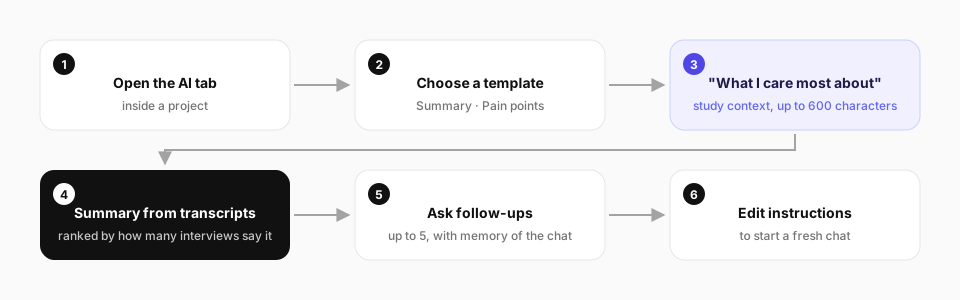
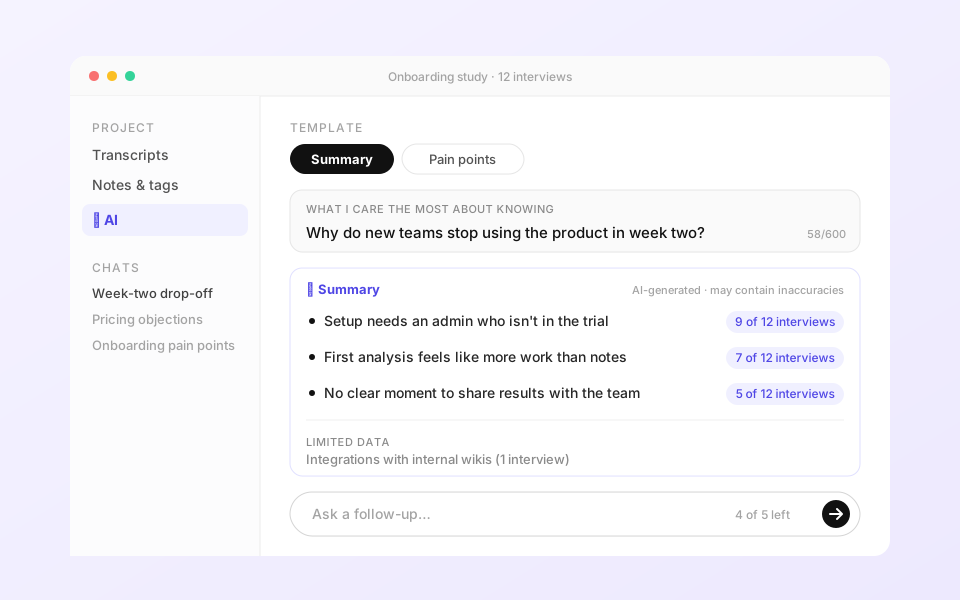
The design included several decisions worth noting:
I tested the staging build end-to-end before every release.
Once engineering shared the first staging build on March 10, 2025, I started testing it immediately — not just for bugs, but for the experience. Did it actually feel like the thing we designed? Did the AI output hold up on real projects?
I tested the full flow on two projects end-to-end. The summary generation worked. But I found a prompt issue in the follow-up flow: the model was answering questions that had nothing to do with the research data — it would just invent a response. I wrote a fix in real-time directly on staging and shared it with the engineer:
The rest of the build feedback covered UI, UX, and edge cases:
This kind of close involvement in build QA — not just reviewing screens but testing the actual product — meant issues were caught before they reached users, and the shipped experience was significantly closer to the intended design.
Shipped on March 18, 2025.
The AI Insight Wizard went live in production on March 18, 2025 — named and analytics-tracked under "AI Insights Wizard" from March 21. Here's what shipped in v1:
Within three months of launch, the AI Wizard was winning the kinds of deals we had been losing. Market sentiment shifted. Where users once said "your AI isn't at par," they started saying "Looppanel's AI is the best in the market."
What this project taught me about designing with AI.
The most unusual part of this project was that design work started at the command line, not in Figma. Writing and testing prompts before drawing a single screen forced a different kind of thinking: what does the model need to produce a good outcome? What does the user need to feel confident in that outcome? Those questions shaped everything downstream.
Running the analysis myself — on real user projects, for weeks — gave me a kind of empathy I couldn't have got from user interviews alone. I felt the cognitive load of moving between transcript, tagging, and insight generation. I understood why people gave up halfway. That experience directly shaped the product decision to collapse the workflow.
The win/loss analysis was also a reminder that sometimes the most valuable design input isn't a usability session — it's a sales call. The pattern of why we were losing deals became the clearest possible brief for what to build.
What I learned
- Prompts are design artefacts. The words you give the model shape the experience as much as the interface. Iterate on them like prototypes.
- Do the thing yourself. Running analysis on real user projects gave me insights I couldn't have got from observation alone. The best research brief sometimes comes from lived experience of the problem.
- Win/loss calls are a design input. The clearest possible brief came from understanding exactly why we were losing deals — not from a workshop.
- Trust is the product. Citations weren't a nice-to-have — they were the thing that would make researchers actually trust and use the output. We deferred them for v1, but they were always the north star.
- Scope to ship, not to impress. V1 shipped one template and five follow-ups. That was enough to prove the concept and start winning deals. The instinct to wait until everything is built is the enemy of learning.
"Designing AI isn't about replacing the researcher —
it's about giving them something they'd trust enough to actually use."